SEO Audits Should Not Require Expensive Tools
Most SEO professionals and website owners rely on expensive subscription tools for site audits. These platforms charge fifty to hundreds of dollars per month, require lengthy setup processes, and generate reports so dense with data that extracting actionable insights feels like a research project in itself. Tensor offers a fundamentally different approach: install a free SEO audit agent from the marketplace, navigate to any URL, and get a comprehensive audit report in seconds.
The Tensor SEO Audit agent is one of the most popular agents in the marketplace, and for good reason. It combines the thoroughness of premium audit tools with the simplicity of a single click. In this tutorial, you will learn how to install it, run your first audit, interpret the results, and export professional reports.
Installing the SEO Audit Agent
Open the Tensor sidepanel and navigate to the Marketplace tab. Search for "SEO Audit" and you will find the official agent, which has been verified and rated by thousands of users. Click Install, and within a few seconds, the agent is ready to use. No configuration is required for basic audits.
Once installed, the agent appears in your agent library. You can access it anytime by typing /seo-audit in the Tensor chat, or by right-clicking on any page and selecting Tensor > Run SEO Audit from the context menu.
Running Your First Audit
Navigate to the page you want to audit. It can be your own website, a competitor's site, or any public URL. Open the Tensor sidepanel and type:
"Run an SEO audit on this page."
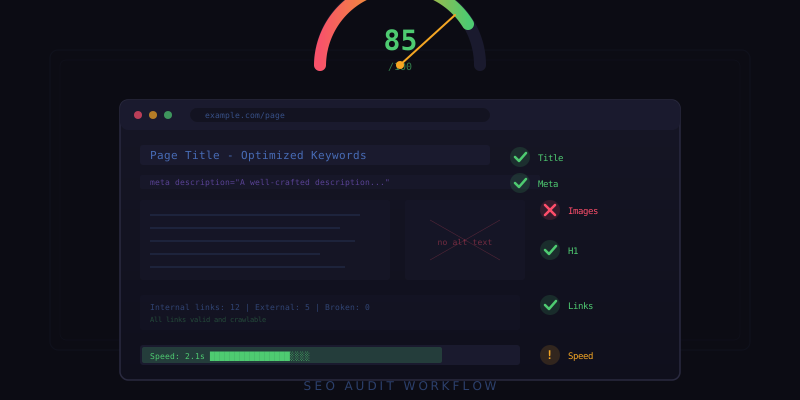
The agent immediately begins analyzing the page across multiple dimensions. Within ten to fifteen seconds, you receive a structured report covering every major SEO factor. Here is what the audit checks:
Meta Tags Analysis
The agent inspects all critical meta tags and evaluates their effectiveness:
- Title tag: Checks length (optimal 50-60 characters), keyword placement, and uniqueness. Flags titles that are too long, too short, or missing entirely.
- Meta description: Evaluates length (optimal 150-160 characters), presence of target keywords, and whether it reads as a compelling call to action. Missing descriptions are flagged as high-priority issues.
- Open Graph tags: Verifies og:title, og:description, og:image, and og:type are present and properly formatted for social media sharing.
- Twitter Card tags: Checks for twitter:card, twitter:title, and twitter:image to ensure proper display on Twitter.
- Canonical URL: Verifies the canonical tag is present and points to the correct URL, preventing duplicate content issues.
- Robots meta: Checks for noindex, nofollow, or other directives that might inadvertently prevent indexing.
Heading Structure
Proper heading hierarchy is critical for both accessibility and SEO. The agent maps the complete heading structure and identifies issues:
- Verifies exactly one H1 tag exists on the page.
- Checks that headings follow a logical hierarchy without skipping levels.
- Evaluates heading length and keyword relevance.
- Flags empty headings or headings used purely for styling.
Link Analysis
The agent crawls all links on the page and categorizes them as internal, external, or broken:
- Internal links: Counts total internal links, checks for orphan pages, and evaluates anchor text diversity.
- External links: Identifies outbound links, checks their status codes, and flags any pointing to broken or suspicious destinations.
- Broken links: Tests every link on the page and reports any that return 404 or other error status codes.
- Nofollow usage: Audits the use of rel="nofollow" and rel="sponsored" attributes.
Image Optimization
Images are often the lowest-hanging fruit for SEO improvement. The agent checks every image on the page:
- Alt text: Identifies images missing alt attributes and evaluates existing alt text for keyword relevance and descriptiveness.
- File size: Flags images that are excessively large and could be compressed without visible quality loss.
- Format: Recommends modern formats like WebP or AVIF for images still served as PNG or JPEG where browser support allows.
- Lazy loading: Checks whether below-the-fold images use lazy loading to improve initial page load performance.
- Dimensions: Flags images without explicit width and height attributes, which can cause layout shift.
Performance Indicators
While a full performance audit requires tools like Lighthouse, the SEO agent captures key performance signals directly relevant to search rankings:
- Page size: Total HTML, CSS, JavaScript, and image weight of the page.
- Request count: Number of HTTP requests required to load the page.
- Render-blocking resources: Identifies CSS and JavaScript files that block initial rendering.
- Mobile viewport: Verifies the viewport meta tag is present and properly configured.
- HTTPS: Confirms the page is served over a secure connection.
Reading the Audit Report
The audit report is organized by severity: critical issues appear first, followed by warnings, then informational notes. Each issue includes a clear description of what was found, why it matters for SEO, and a specific recommendation for how to fix it. This prioritized format lets you focus your effort where it will have the most impact.
At the top of the report, you get an overall SEO score from 0 to 100. This score is a weighted aggregate of all individual checks, giving you a quick sense of the page's overall SEO health. Scores above 80 indicate a well-optimized page, while scores below 50 suggest significant room for improvement.
Exporting Your Report
The audit report can be exported in multiple formats for sharing with your team or clients. Click the Export button in the report view and choose from markdown, HTML, or PDF. The exported report includes all findings, scores, and recommendations in a professional layout that is ready to share without additional formatting.
For agencies managing multiple client sites, you can run audits across several URLs and export them as a batch report, giving each client a customized document with their site's specific findings and action items.
Making SEO Audits a Habit
The real value of one-click auditing is that it removes every barrier to running regular checks. Instead of scheduling quarterly audits with expensive tools, you can audit a page every time you publish new content, launch a feature, or make a design change. Tensor makes SEO auditing as casual as checking your email, and that consistency is what drives long-term search performance improvement.