Open source AI models: A developer’s privacy guide
Most developers assume “open source” means the same thing whether you’re talking about a Linux kernel or a large language model. That assumption is wrong, and it has real consequences for anyone building privacy-sensitive workflows or local integrations on macOS. Many models promoted as “open source” fail the official OSI definition entirely, leaving developers exposed to license violations, unexpected cloud dependencies, or audit gaps they never anticipated. This guide cuts through the marketing noise to give you a clear, practical framework for evaluating AI models before you build anything on top of them.
Table of Contents
- What actually makes an AI model open source?
- Open source AI vs. open-weight: Key differences developers must know
- Why licenses and fine print matter: Avoiding compliance pitfalls
- Power user benefits: Local privacy, integration, and customization
- Why the ‘open source’ label isn’t enough—and how to verify real openness
- Ready to put open source AI to work locally?
- Frequently asked questions
Key Takeaways
| Point | Details |
|---|---|
| OSI definition critical | True open source AI models require use, study, modify, and share freedoms with access to all necessary artifacts. |
| Open-weight isn’t open source | Open-weight models often lack essential elements for modification and privacy-focused integration. |
| Always check licenses | Marketing language can be misleading; inspect licenses and artifacts before use. |
| Local privacy advantages | Fully open source AI lets you audit, customize, and deploy securely on your own systems. |
What actually makes an AI model open source?
With the confusion in mind, it’s essential to nail down the true definition before diving into practical implications.
The Open Source Initiative (OSI) is the organization that defined open source software decades ago, and in 2024 it extended that framework to AI. The definition is precise and demanding. It does not reward vague gestures toward transparency.
According to the OSI, an open source AI model grants four core freedoms: the right to use the system for any purpose, the right to study how it works, the right to modify it, and the right to share it with or without modifications. These freedoms must apply to everyone, with no field-of-use restrictions. A model that lets you run it freely but prohibits commercial use fails the test immediately.
Equally important is what artifacts must be provided:
- Model weights in a format that allows you to actually run and modify the model
- Source code used for training, fine-tuning, and inference
- Training data or, at minimum, sufficient documentation to reproduce the model’s behavior
- Supporting scripts and configuration needed to rebuild or retrain the system
“An open source AI model must provide access to the model artifacts required to exercise all four freedoms, including use, study, modification, and redistribution, for any purpose.” — Open Source Initiative
That last point about training data is where most models fail quietly. Without access to the data used to train a model, you cannot truly study or reproduce it. You can run it, but you cannot audit its biases, verify its safety properties, or meaningfully modify its behavior at a foundational level. For developers building privacy-sensitive tools, that gap is not a minor inconvenience. It is a fundamental limitation.
Open source AI vs. open-weight: Key differences developers must know
Now that we have the core definition, let’s see how it differs from terms you’ll frequently encounter in developer communities.
The term “open-weight” has become the de facto marketing language for models that release their parameters publicly but withhold everything else. It sounds like open source. It is not.
Open-weight is not the same as open source. Full training data and code are often absent from open-weight releases, which means developers get the ability to run inference but not the ability to truly understand, reproduce, or audit the model. Think of it like receiving a compiled binary without the source code. You can execute it. You cannot inspect what it actually does at a fundamental level.
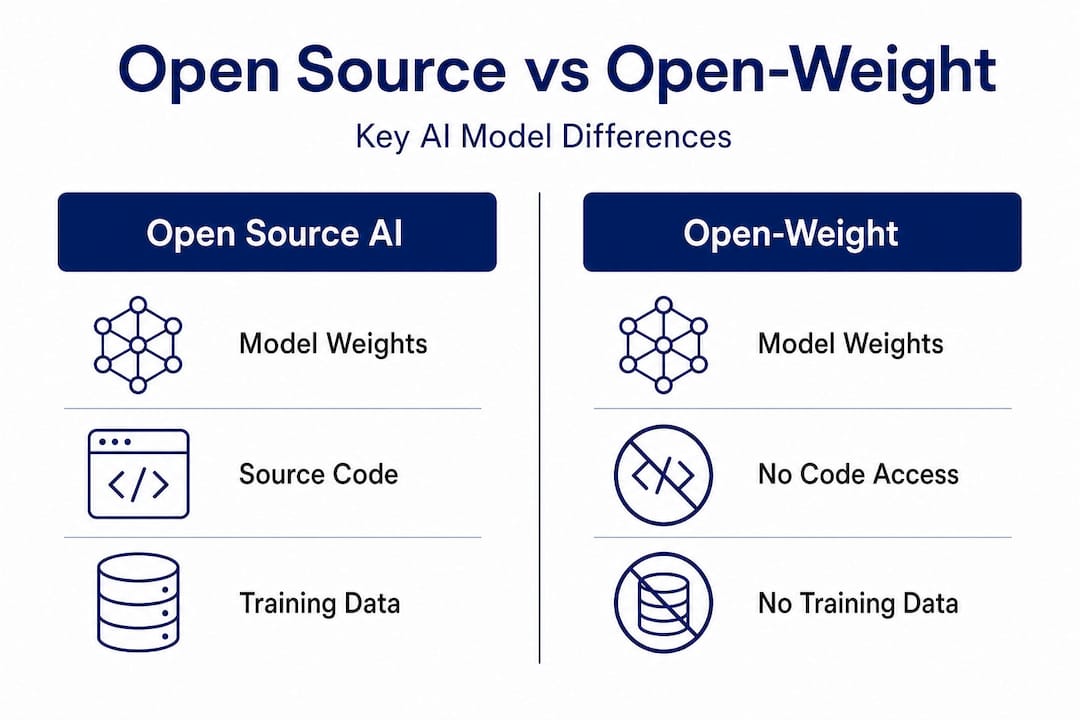
Here is a direct comparison to make the distinction concrete:
| Feature | Open source AI (OSI) | Open-weight | Closed model |
|---|---|---|---|
| Model weights | Provided | Provided | Not provided |
| Training source code | Required | Often absent | Not provided |
| Training data | Required | Rarely provided | Not provided |
| Inference code | Required | Sometimes provided | API only |
| License freedoms | All four, no restrictions | Partial, often restricted | Proprietary |
| Commercial use | Unrestricted | Often restricted | Per terms |
| Auditability | Full | Limited | None |
| Reproducibility | Possible | Unlikely | Impossible |
The practical impact for macOS developers is significant. If you are building a local voice agent, a browser automation tool, or a research pipeline, you need to know whether you can modify the model’s behavior, fine-tune it on private data, or audit its outputs. Open-weight models let you do some of that. Truly open source models let you do all of it.

Pro Tip: When you see a model described as “open” without further qualification, immediately check whether training code and data are included. If the release page only links to weights and a model card, you are looking at open-weight, not open source.
Fine-tuning is another area where the distinction bites developers. You can fine-tune an open-weight model on your own data, but if the base model’s training methodology is opaque, you cannot fully predict how your fine-tuning will interact with behaviors baked in during pretraining. For privacy-sensitive applications, that unpredictability is a real risk.
Why licenses and fine print matter: Avoiding compliance pitfalls
Knowing the difference is only useful if you can check openness for yourself, which means digging into licenses and fine print.
License terms, not marketing claims, determine whether an AI model is actually open source. The OSI makes this point explicitly, and real-world examples confirm it repeatedly. License terms are what determine open source status, regardless of how a model is marketed or described in press releases.
Here is a step-by-step process for verifying whether a model meets OSI-aligned openness before you build on it:
- Locate the full license text. Do not rely on the README summary or the model card description. Find the actual license file in the repository.
- Check for field-of-use restrictions. Any clause that limits use to non-commercial purposes, specific industries, or specific geographies disqualifies the model from OSI compliance.
- Verify artifact availability. Confirm that training code, inference code, and data (or detailed data documentation) are all provided, not just the weights.
- Look for share-alike clauses. Some licenses require derivative models to be released under the same terms. This may be acceptable for your use case, but you need to know it upfront.
- Check for user count or revenue thresholds. Several popular models include clauses that trigger different (often more restrictive) terms once you exceed a certain number of monthly active users or revenue threshold.
- Confirm modification rights. Some licenses allow redistribution but restrict modification, which fails the OSI standard.
“The label ‘open source’ is being used as marketing by some model providers, but the actual license terms tell a very different story.” — Open Source Initiative
A concrete example: Meta’s Llama models have been widely described as open source in mainstream coverage. The OSI has formally stated that Llama’s license fails their definition because it includes field-of-use restrictions and does not meet the reproducibility requirements. This is not a technicality. It means developers relying on Llama for privacy-critical or enterprise applications may be operating outside the terms they assumed applied.
Pro Tip: Bookmark the OSI’s approved license list and cross-reference any model’s license against it. If the license is not on that list, treat it as proprietary until proven otherwise.
For macOS power users running local inference, the compliance risk is lower than for enterprise deployments, but the privacy implications remain. A model with restrictive terms may require you to agree to terms that affect how you can use outputs, share results, or integrate the model into tools you distribute to others.
Power user benefits: Local privacy, integration, and customization
Understanding why real openness matters leads naturally to the practical advantages for privacy and integration.
Truly open source AI models unlock a set of capabilities that closed or open-weight alternatives simply cannot match. For developers and power users on macOS, the most important of these is the ability to run everything locally with full confidence about what the model is doing.
Access to all model artifacts enables modification for local privacy and use-case integration in ways that partial releases cannot. When you have the full stack, you can strip telemetry, modify inference behavior, and verify that no data leaves your device. That is not possible when you are working with a model whose internals are opaque.
Here are the core benefits that genuinely open models deliver for local macOS workflows:
- Zero cloud dependency. Inference runs entirely on your hardware. No API calls, no rate limits, no data leaving your machine.
- Full auditability. You can inspect every component of the model’s behavior, from tokenization to output sampling.
- Custom fine-tuning with confidence. Knowing the training methodology lets you fine-tune more effectively and predict how the model will respond to your data.
- Integration with native macOS tooling. Open models can be embedded directly into Automator workflows, called via AppleScript, or wired into custom pipelines without worrying about license violations.
- Security review capability. For sensitive environments, you can conduct a full security audit of the model and its runtime, something impossible with closed systems.
| Developer benefit | Truly open source | Open-weight | Closed API |
|---|---|---|---|
| Private local inference | Full | Full | No |
| Modify model behavior | Yes | Limited | No |
| Audit for security | Full | Partial | No |
| macOS workflow integration | Unrestricted | Restricted by license | API terms apply |
| Fine-tune on private data | Full control | Possible, limited insight | No |
| Reproduce or rebuild | Yes | Unlikely | No |
The integration angle is especially relevant for macOS developers. Native app automation, voice command pipelines, and browser agents all benefit from models that can be customized at the weight level, not just prompted differently. When you control the full stack, you can optimize for latency, memory footprint, and output format in ways that generic API access never allows.
Why the ‘open source’ label isn’t enough—and how to verify real openness
Here is an uncomfortable truth the AI community has been slow to acknowledge: the phrase “open source AI” has been so thoroughly co-opted by marketing that it now means almost nothing without independent verification. Developers who build on “open” models without checking the license are making the same mistake as someone who assumes a library is MIT-licensed because it is on GitHub.
The problem runs deeper than individual licenses. Multiple layers of a model may be separately licensed, meaning the weights, the training code, and the dataset each carry different terms. A model can be genuinely open at the weight level, partially open at the code level, and completely closed at the data level. Each layer needs separate verification.
Our take is this: treat every “open source” AI claim as a hypothesis, not a fact. The verification process described earlier in this article is not optional for developers building privacy-sensitive or production-grade tools. It is the minimum due diligence.
The OSI’s definition exists precisely because the software world learned this lesson the hard way. Before the OSI formalized open source criteria, vendors routinely described proprietary software as “open” because they published some documentation or allowed viewing of source code. The AI ecosystem is replaying that history right now, and developers who do not apply the same skepticism they would to a software license are going to get burned.
Practically speaking, adopt a verification checklist as a standard part of your model evaluation workflow. Treat it the same way you would treat dependency auditing or security scanning. The models that pass the full OSI test are fewer than the marketing suggests, but they exist, and they are the only ones you should trust for genuinely private, locally controlled applications.
Ready to put open source AI to work locally?
For developers who want to move beyond evaluating models and start building with them, the architecture of your local AI stack matters as much as the model you choose.
MingLLM is built from the ground up for exactly this use case: personal superintelligence that runs entirely on your macOS device, with no cloud dependency and full transparency into what the system is doing. Every model, memory process, and reasoning step runs on your hardware. The platform integrates voice agents, browser automation, research tools, and action logging into a single local stack, giving power users and developers the kind of deep macOS integration that open source AI makes possible. If you have done the work to understand what real openness means, MingLLM is the environment where that knowledge pays off.
Frequently asked questions
What are the minimum requirements for a model to qualify as open source AI?
A model must grant freedom to use, study, modify, and share, and provide access to the model weights, source code, and relevant training artifacts. The OSI requires all freedoms plus access to the necessary artifacts, with no field-of-use restrictions.
Does ‘open-weight’ guarantee all freedoms of open source AI?
No, open-weight models often lack source code, training data, or full documentation, which are essential for real open source AI. Open-weight is not sufficient for open source AI status under the OSI definition.
Why is verifying the license important when using AI models locally?
Licenses can contain restrictions that prevent true openness or local deployment, so always read the terms before use. Even models marketed as open can carry restrictions that limit freedoms in ways that affect privacy-sensitive or commercial applications.
Can I use any open source AI model for commercial applications?
Only if the license explicitly allows unrestricted commercial use under OSI’s definition; some “open” models restrict field of use. Field-of-use restrictions are one of the most common ways otherwise permissive licenses fail the OSI standard.