How AI Research Tools Work: a Professional Guide

Most people assume AI research tools are sophisticated search engines that paraphrase results and hand them back to you. That misconception leads to underuse, misuse, and a lot of frustration. Understanding how AI research tools work reveals something far more capable: these systems run multi-step workflows that plan queries, search databases, read sources, verify claims, and synthesize findings into structured outputs. This guide breaks down the architecture, tool execution mechanics, real-world applications, and the limitations every professional should know before building these tools into their workflow.
Table of Contents
- Key takeaways
- How AI research tools work: the core architecture
- Tool execution systems and safety mechanisms
- Real-world applications of AI research tools
- Best practices, risks, and limitations
- My take on where AI research tools actually deliver
- Take your research further with Mingllm
- FAQ
Key takeaways
| Point | Details |
|---|---|
| Multi-step workflows, not simple search | AI research tools run layered pipelines from planning through synthesis, not single-pass retrieval. |
| Verification prevents hallucination | Grounding and citation tracking are built-in architectural features that keep outputs credible. |
| Single-agent vs. multi-agent matters | Multi-agent systems significantly outperform single-agent setups on broad research tasks. |
| Human oversight stays non-negotiable | AI reduces repetitive discovery work, but final quality judgment still belongs to the researcher. |
| Tool diversity improves coverage | Relying on one tool creates blind spots; complementary tools catch what single systems miss. |
How AI research tools work: the core architecture
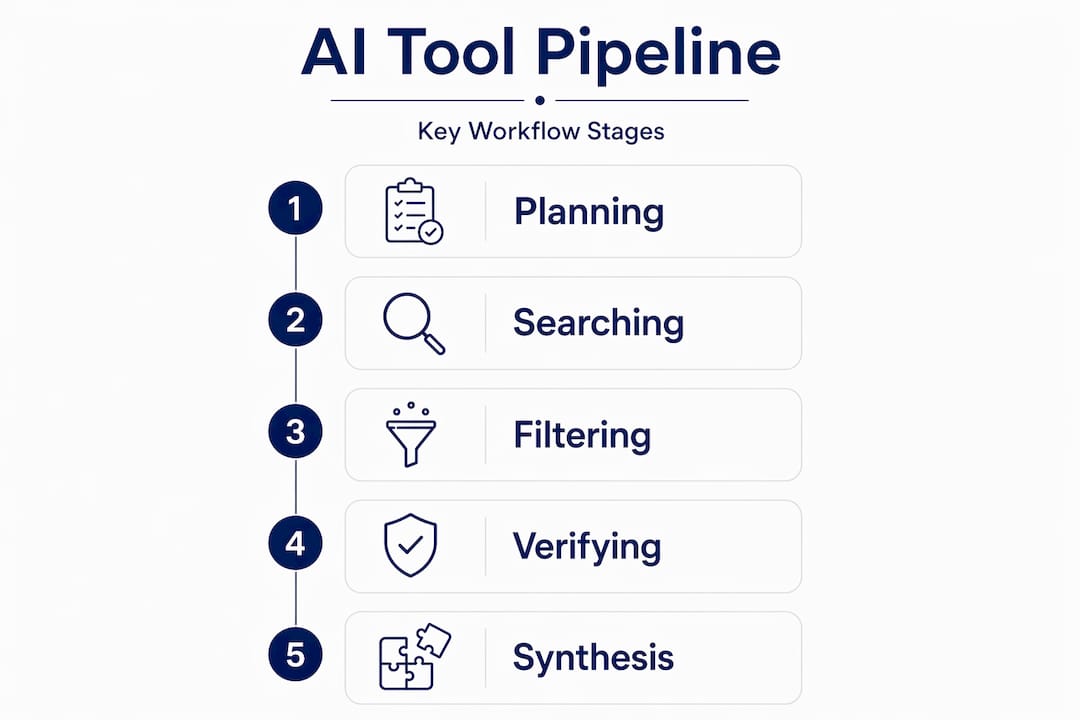
The biggest misconception about AI research tools is that they run a single pass over some index and return a summary. The reality is a structured, multi-step pipeline: Planning → Searching → Reading → Filtering → Verifying → Synthesizing → Reporting. Each stage has a distinct function, and the output of one stage feeds the constraints of the next.
Planning and searching
At the planning stage, a Large Language Model (LLM) breaks a research question into specific sub-queries. It identifies which databases, APIs, or document stores to target and decides how many parallel search threads to open. This is not keyword matching. The model reasons about scope, likely source quality, and what kinds of evidence would actually answer the question.
The searching stage runs those sub-queries against real information sources, which might include academic indexes, web search APIs, internal document stores, or code repositories. The key difference from a standard search engine is that the AI tracks provenance from the start. Every retrieved piece of content carries a source reference that travels through the rest of the pipeline.
Filtering, verifying, and synthesizing
After retrieval, a filtering layer removes off-topic, duplicated, or low-credibility material. Then comes the verification stage, which is where AI research tools earn their value. Claim-source tracing and guardrails prevent the model from producing confident narratives about facts that were never actually found in the retrieved sources. Without this layer, the model would fill gaps with plausible-sounding but ungrounded content.

Synthesis assembles the verified material into a coherent output, whether that is a structured report, a comparison table, or an annotated bibliography. The reporting stage formats everything with citation markers so a human can audit the chain back to original sources.
Single-agent vs. multi-agent systems
A single-agent system runs the entire pipeline sequentially through one model. It works well for focused, narrow questions. Multi-agent systems assign specialized sub-agents to different tasks: one agent searches, another reads and extracts, a third verifies, a fourth synthesizes. Multi-agent systems outperform single-agent setups by 90.2% on breadth-first research tasks, according to Anthropic’s own reporting. For complex literature reviews or cross-domain research, the architecture choice matters enormously.
Pro Tip: Start with a single-agent setup to understand how your queries perform before scaling to multi-agent. The debugging is far simpler, and you will spot gaps in your workflow before they compound.
Tool execution systems and safety mechanisms
Understanding how AI tools function at the execution level clarifies why some outputs are reliable and others are not. When an LLM decides it needs to call a tool (retrieve a document, run a web search, execute code), it produces a structured tool call object. A separate runner component intercepts that call, executes the actual function, and returns the result to the model.
Here is what happens inside that execution pipeline:
- Tool call generation. The model outputs a structured request specifying the tool name and parameters.
- Runner execution. The runner validates the call, executes the real function (an API call, a file read, a code run), and captures the output.
- Result injection. The result gets fed back into the model’s context so it can reason over actual retrieved data rather than invented data.
- Guardrail checks. Safety filters run on both the tool call and the returned result to catch harmful requests or dangerously low-confidence outputs.
- Human approval flows. For high-stakes actions, the pipeline can pause and route the decision to a human before proceeding.
Tool execution and safety guardrails are integrated architectural features, not afterthoughts. This distinction matters. Systems that bolt on safety as a final filter are far more brittle than systems where safety logic runs at each execution step.
One underappreciated risk is tool-call rejection handling. When a tool call fails or gets rejected, how that status is represented in the model’s context directly affects hallucination risk. If the model sees an ambiguous failure status, it may proceed as though the call succeeded and confabulate the missing information. Well-designed SDKs manage tool call metadata and lifecycle hooks explicitly to prevent this failure mode.
Pro Tip: When evaluating any AI research tool for professional use, ask specifically how it handles tool call failures. A tool that gracefully surfaces “source not found” is more trustworthy than one that silently fills the gap.
Tool categories in most research systems fall into three groups. Function tools are custom logic the developer defines. Hosted tools are managed services like web search or file retrieval that the platform provides. Local runtime tools execute code or interact with the local operating system directly. Understanding AI data grounding techniques becomes especially relevant here, because hosted and local tools differ sharply in how they source and verify the data they return.
Real-world applications of AI research tools
Knowing the architecture is useful. Seeing it applied to actual research work is where the value becomes tangible. Here is how different tool types map to concrete research phases.
Literature review and evidence synthesis
Tools like Elicit operate directly on scholarly databases. Elicit retrieves papers, automates screening, and extracts data into tables automatically, cutting the most labor-intensive part of a systematic review from weeks to hours. A researcher defines inclusion and exclusion criteria; the tool applies them across thousands of abstracts and returns a structured dataset ready for analysis.
Google NotebookLM takes a different approach. Rather than searching the open web, NotebookLM restricts responses to uploaded documents and cites specific passages in every answer. This makes it genuinely useful for deep-diving a fixed document corpus without the risk of the model pulling in unrelated outside information.
Autonomous experimentation
AutoResearch automates ML experimentation through a ratchet mechanism: the agent proposes a code change, runs a short training job, commits the change if it improves performance, and reverts if it does not. The entire audit trail lives in git history. This is a fundamentally different AI research tool application: not discovery, but self-directed improvement within strict evaluation constraints.
Benefits summary across use cases
| Research phase | Tool type | Key benefit |
|---|---|---|
| Literature discovery | Semantic search tools | Faster identification of relevant papers |
| Evidence extraction | Structured analysis tools | Automated data tables from abstracts |
| Document Q&A | Source-grounded notebooks | Citation-backed answers within a fixed corpus |
| Citation mapping | Graph-based tools | Visualizes conceptual relationships between papers |
| ML experimentation | Autonomous agent loops | Validated code improvements with full audit trails |
The benefits of AI research tools are real, but they are not uniform. Time savings are highest in the discovery and extraction phases. Structured output quality depends heavily on how well the underlying verification layer works. Reliable audit trails require tools that expose source citations rather than hiding them behind a summary.
Best practices, risks, and limitations
The same capabilities that make AI research tools powerful introduce failure modes that are easy to miss until they cost you something.
- Coverage gaps are invisible by design. No single tool indexes every relevant source. Researchers should use multiple tools with complementary databases to avoid missing key studies. A tool that finds 80% of relevant papers looks complete until the missing 20% turns out to matter.
- Confidence does not equal accuracy. AI agents reduce repetitive work and surface sources faster, but final quality judgment remains the researcher’s responsibility. An AI can confidently cite a paper that does not support the claim it is being cited for.
- Autonomous loops can get stuck. AutoResearch-style systems can converge on local optima, repeatedly testing small variations that never escape a performance plateau. Human check-ins at defined intervals prevent this failure mode.
- Privacy and security matter at the tool level. Research workflows that send proprietary documents to cloud-hosted tools create real exposure. The architecture of where processing happens, locally or remotely, is a security decision, not just a performance one.
“AI tools reduce repetitive work and help find sources faster, but final judgment remains human responsibility.” — Building AI Research Agent
The most important risk is overconfidence in the output. These tools produce polished, well-formatted results that read as authoritative. That formatting quality does not guarantee factual accuracy. Treating AI research output as a first draft that requires human verification is not a workaround. It is the correct workflow.
My take on where AI research tools actually deliver
I’ve watched a lot of professionals adopt AI research tools expecting them to replace the hard thinking. They don’t. What they do instead, when designed well, is handle the mechanical parts of research so the hard thinking can actually happen.
In my experience, the hybrid human-plus-AI workflow is not a compromise. It’s the most reliable configuration available right now. The AI handles retrieval, extraction, and first-pass synthesis. The human applies judgment to source selection, claim validation, and deciding what the evidence actually means. Neither can do the other’s job adequately.
What I’ve learned about autonomous systems specifically is that verification layers are the entire ballgame. A research agent without strong grounding and citation tracking produces outputs that look credible and are not. The polish is the hazard. I’ve seen researchers treat beautifully formatted AI summaries as settled facts because nothing in the presentation flagged uncertainty.
My practical advice: start simple. A single-agent system with explicit citation requirements will teach you more about how these tools fail than any documentation will. Once you understand the failure modes in a simple setup, you can make informed decisions about when multi-agent complexity actually earns its cost.
Security is the part most people skip until it is too late. If your research involves proprietary data, the question of whether processing happens locally or in the cloud is not a minor configuration detail. It is a fundamental choice about who has access to your work.
— steve
Take your research further with Mingllm
If the workflows described here sound like what you want for your own research practice, Mingllm is built precisely for this kind of work.

Mingllm runs entirely on your local device, which means your documents, queries, and research outputs never leave your hardware. Its research tools structure and analyze scattered sources with source citations built in, so every output carries a traceable chain back to the original material. The browser agent synthesizes information from your open tabs in real time. The action logs give you proof traces for every step the system takes.
For professionals who need both depth and privacy in their research workflows, Mingllm offers the verification-first architecture this article describes, running entirely under your control. Visit mingllm.com to see how it works.
FAQ
What is the basic workflow of an AI research tool?
AI research tools run a multi-step pipeline that includes planning, searching, reading, filtering, verifying, synthesizing, and reporting. Each stage builds on the previous one to produce grounded, citation-backed outputs.
How do AI algorithms work in research contexts?
AI algorithms in research tools combine LLM reasoning with external tool calls to retrieve, filter, and verify information from real sources. The model plans the search strategy, executes calls through a runner component, and synthesizes results using only verified retrieved content.
What are the benefits of AI tools for academic research?
The primary benefits include faster literature discovery, automated data extraction, structured outputs with citations, and reduced time spent on repetitive screening tasks. Human oversight remains necessary to validate source relevance and claim accuracy.
Why should I use multiple AI research tools?
No single tool indexes every relevant source, so using multiple tools with different database coverage reduces the risk of missing key studies. Library experts consistently recommend complementing rather than replacing standard research workflows.
How does local AI processing improve research privacy?
When AI processing runs locally on your device, documents and queries are never transmitted to external servers, eliminating third-party data exposure. This matters most when research involves proprietary, confidential, or pre-publication material.