How to protect confidential data when using AI tools

Confidential data leaks through AI tools are not hypothetical disasters reserved for careless organizations. They happen to experienced macOS developers who paste a client’s database schema into a prompt, or to power users who upload a proprietary algorithm to an automation agent without thinking twice. The same productivity gains that make AI automation so compelling also create invisible pipelines that carry your most sensitive information straight to external servers. This guide walks you through a concrete, enforceable framework for assessing exposure, sanitizing inputs, hardening your lifecycle security, and building audit trails that hold up under scrutiny.
Table of Contents
- Assess your AI tools and privacy exposure
- Prepare privacy-preserving workflows on macOS
- Implement lifecycle security for confidential AI workflows
- Respond and verify: Building effective containment and audit trails
- A perspective: Why developer workflow, not just tool selection, determines real data security
- Enable secure automation with local-first AI
- Frequently asked questions
Key Takeaways
| Point | Details |
|---|---|
| Containment first | Once confidential data leaves your control through AI tools, focus on containment and governance, not reversal. |
| Privacy by preprocessing | Automated redaction and token substitution before AI requests reduces exposure and strengthens compliance. |
| Lifecycle security | Encrypt, control access, and audit confidential data across all phases of your workflow. |
| Workflow discipline | Daily user actions and structured response plans matter as much as technical safeguards for preventing leaks. |
Assess your AI tools and privacy exposure
To determine where protection is needed, you must first know what data, tools, and pathways in your macOS workflow create exposure.
Most developers underestimate how many surfaces carry confidential data outward. It is not just the obvious file uploads. Every prompt you type, every API request your automation scripts fire, and every browser session a web agent opens can carry fragments of sensitive context. Mapping those surfaces is the first practical step.
Start by listing every AI-assisted action in your current workflow. Ask yourself three questions for each one: What data does this action consume? Where does that data travel? Who or what controls the destination?
Common exposure points in macOS AI workflows:
- Prompt content containing client names, financial figures, or internal project details
- File attachments fed to AI agents for summarization or analysis
- API payloads that include raw database queries or schema definitions
- Browser agent sessions that read open tabs containing authenticated, confidential pages
- Voice commands that reference internal systems or credentials by name
- Memory or context files that persist sensitive data across sessions
The containment mindset is the most important mental shift you can make here. Once data leaves your device and reaches an external model endpoint, you have almost no practical recourse. As trade secrets risk exiting a one-way door when data is fed to AI tools, leakage risks cannot always be reversed. Treat every AI interaction as a governance problem, not a technical one you can patch later.
“The most practical approach is to treat AI interaction as a containment and governance problem with rapid, structured response rather than assuming you can retrieve or delete what has already been shared.”
Here is a quick reference for classifying your data risk level before any AI interaction:
| Data type | Risk level | Recommended action |
|---|---|---|
| Public product documentation | Low | Safe for most AI tools |
| Internal meeting notes | Medium | Redact names and project codes |
| Client PII or financial records | High | Tokenize before any AI request |
| Source code with proprietary logic | High | Use on-device models only |
| Authentication credentials or API keys | Critical | Never include in any AI prompt |
| Trade secrets or unreleased IP | Critical | Local processing only, no cloud |
This table is not exhaustive, but it gives you a decision framework you can apply in seconds before each workflow step. The goal is to build the habit of classification before action, not after.
Prepare privacy-preserving workflows on macOS
Once you have mapped your exposure points, the next step is to build in privacy controls, starting with automated data sanitization before any AI request.

The most dangerous assumption in AI automation is that a well-worded instruction to the model will keep your data safe. Telling an AI “do not store this information” or “treat this as confidential” provides no technical guarantee whatsoever. The only reliable control is preventing the sensitive data from leaving your environment in the first place.
Keeping sensitive data from leaving your organization’s control through automated redaction or token substitution before requests to third-party AI services is the primary privacy-preserving control. This means building a preprocessing layer that sits between your raw data and your AI tool, not relying on the AI tool itself to handle sensitivity.
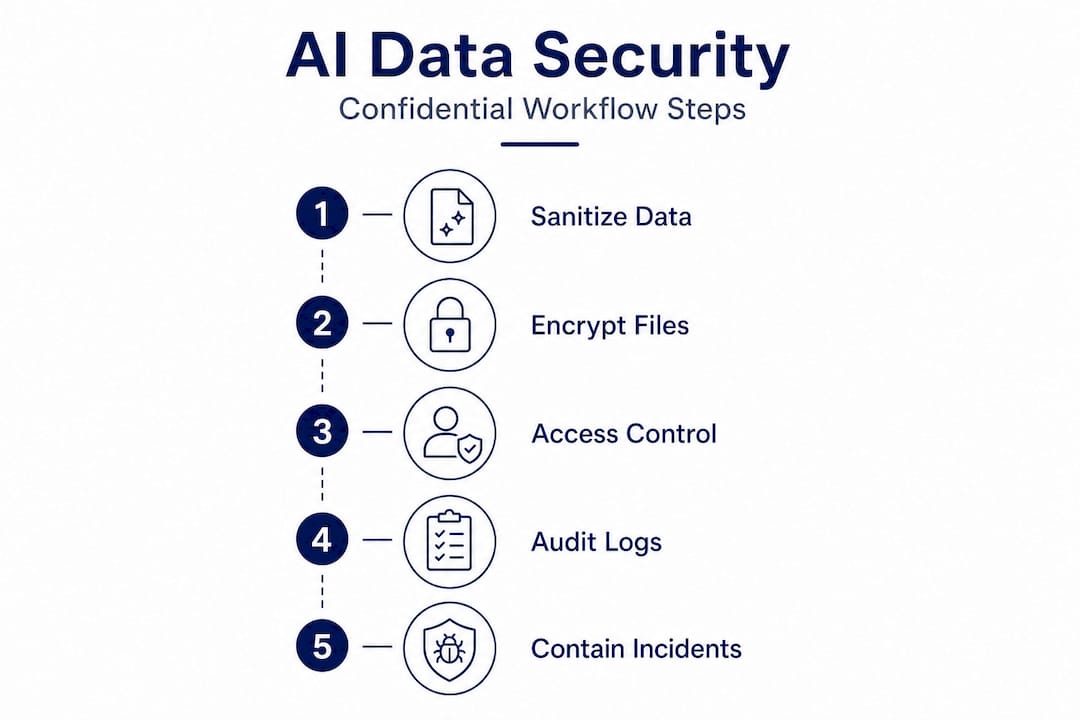
Steps to build a sanitization pipeline on macOS:
- Identify all fields in your data sources that qualify as PII, trade secrets, or confidential business information.
- Write or adopt a redaction script that replaces those fields with consistent placeholder tokens before any data reaches an AI prompt or API call.
- Store the mapping between real values and tokens in an encrypted local file, never in the same pipeline that touches the AI tool.
- Add the sanitization step as a mandatory, auditable stage in your automation workflow, not an optional preprocessing note.
- Test the pipeline by intentionally including sensitive values and verifying they are replaced before the AI request fires.
- Review and update your redaction rules whenever your data schema or workflow changes.
Here is a comparison of common privacy filtering approaches available to macOS developers:
| Approach | Privacy strength | Auditability | macOS compatibility | Best for |
|---|---|---|---|---|
| Static regex redaction | Medium | High | Native scripting | Structured PII fields |
| Named entity recognition | High | Medium | Python, local models | Unstructured text |
| Token substitution with mapping | Very high | Very high | Any scripting layer | Repeatable workflows |
| Differential privacy libraries | High | Low | Python-based | Statistical data outputs |
| On-device local model processing | Very high | High | macOS native | All sensitive workflows |
Pro Tip: Build your sanitization pipeline as a standalone shell script or Python module with its own test suite. When you treat it as a first-class component rather than a preprocessing afterthought, you are far more likely to catch regressions when your data format changes.
The key insight here is that automation is your friend. Manual redaction is error-prone and does not scale. A scripted, auditable pipeline that runs before every AI request is the only approach that holds up under compliance review or an incident investigation.
Implement lifecycle security for confidential AI workflows
Beyond preprocessing, maintaining a hardened security posture across the data lifecycle is crucial for sustainable confidentiality.
Sanitizing inputs is necessary but not sufficient. Confidential data can still leak through inadequately secured intermediate files, unencrypted API logs, or overly permissive access controls on your local machine. A lifecycle security approach closes those gaps systematically.
Core lifecycle security practices for developers:
- Encrypt all data at rest that touches your AI pipeline. Use macOS FileVault for disk-level encryption and apply file-level encryption for any intermediate files your automation scripts generate.
- Encrypt all data in transit. Verify that every API call your workflow makes uses TLS 1.2 or higher, and audit your automation scripts for any HTTP endpoints that should be HTTPS.
- Enforce least-privilege access on every component. Your automation scripts should run with the minimum macOS permissions required, not as an administrator account.
- Require authentication before any confidential workflow can execute. Use macOS Keychain for credential storage rather than hardcoding tokens in scripts.
- Log every action your AI automation takes when it touches confidential data. Include timestamps, data identifiers, and the specific action performed.
- Review those logs on a defined schedule, not only after an incident.
A lifecycle-oriented AI data security methodology for developers covers the full arc: encrypt and sanitize, enforce access controls, and add auditability and provenance across the collect, process, build, and use phases. This is not a checklist you complete once. It is a posture you maintain continuously.
Statistic worth noting: Security incidents involving AI tools frequently trace back not to sophisticated attacks but to basic hygiene failures: unencrypted log files, shared credentials, or automation scripts running with excessive permissions. The technical sophistication of your AI tool is irrelevant if the surrounding infrastructure is porous.
Pro Tip: Use macOS’s built-in "launchd` to run your confidential AI automation jobs under a dedicated, restricted user account with no interactive login privileges. This single step dramatically reduces the blast radius if any component in your pipeline is compromised.
Provenance tracking deserves special attention. For every piece of confidential data your AI workflow processes, you should be able to answer: where did this data originate, what transformations were applied, and which AI system touched it? Without that chain of custody, your audit trail is incomplete and potentially useless in a legal or regulatory context.
Respond and verify: Building effective containment and audit trails
The final line of defense is not only protection, but fast detection and documentation, which is critical when working with sensitive business or client information.
Even the best-designed workflows can fail. A developer accidentally pastes unredacted data. A script has a bug that bypasses the sanitization step. A new team member runs an automation without understanding the privacy controls. When that happens, your response speed and documentation quality determine whether the incident is manageable or catastrophic.
“Trade-secret and confidential-information leakage risks cannot always be reversed once the data has been fed to AI tools; the most practical approach is to treat AI interaction as a containment and governance problem with rapid, structured response.”
Incident response checklist for confidential AI data exposure:
- Stop the workflow immediately and isolate the affected pipeline component
- Identify exactly what data was exposed, to which service, and at what timestamp
- Notify relevant stakeholders, legal counsel, or compliance officers based on your organization’s policy
- Document every step you take from the moment of discovery, including timestamps and the identity of who took each action
- Assess whether the exposure triggers any regulatory notification requirements (GDPR, CCPA, HIPAA, or sector-specific rules)
- Review and update your sanitization and access control rules to close the gap that allowed the exposure
- Conduct a post-incident review to determine whether your audit logs provided sufficient detail to reconstruct the event
The documentation step is where most developers cut corners, and it is exactly where regulators and legal teams will focus first. Your audit trail needs to show not just that something happened, but that you had controls in place, detected the issue promptly, and responded in an organized way.
Verify your audit trails regularly, not just after incidents. Schedule a monthly review of your AI workflow logs to confirm they are capturing the right data, that log files are not being silently dropped, and that your retention policy aligns with your compliance obligations. An audit trail you have never tested is an audit trail you cannot trust.
A perspective: Why developer workflow, not just tool selection, determines real data security
Here is an uncomfortable truth that gets buried in most AI security discussions: the tool you choose matters far less than how you use it. Developers spend significant time evaluating AI platforms for privacy features, data retention policies, and compliance certifications. That evaluation is worthwhile. But it creates a false sense of security if it substitutes for workflow discipline.
The most dangerous confidential data exposures we see do not come from flawed AI architectures. They come from routine, careless usage. A developer running late on a deadline who pastes a full database dump into a prompt to save five minutes. A power user who enables an automation agent on a folder that turns out to contain unredacted client contracts. These are not edge cases. They are the norm.
This means that privacy and security must be built into your workflow as structural constraints, not as guidelines you follow when you remember to. Automated sanitization pipelines, mandatory audit logging, and least-privilege execution are not optional enhancements. They are the actual security layer. The AI tool’s privacy policy is a distant second.
The containment and auditability mindset also changes how you think about incidents. If you accept that some exposure is inevitable over a long enough timeline, the question becomes: how fast can you detect it, how completely can you document it, and how quickly can you contain further damage? That framing drives you toward investing in detection and response infrastructure, not just prevention.
Local, on-device AI processing is the most powerful structural control available to macOS developers right now. When the model runs on your hardware and your data never leaves your machine, an entire category of exposure simply does not exist. That is not a marketing claim. It is a logical consequence of the architecture.
Enable secure automation with local-first AI
For teams and individuals ready to implement these confidentiality best practices in their day-to-day macOS automation, the architecture of your AI platform is the foundation everything else rests on.

Local-first AI for macOS eliminates the most fundamental risk in this guide: data leaving your device entirely. MingLLM runs models, memory, and reasoning processes directly on your hardware, so the sanitization pipelines, audit logs, and access controls you build operate in an environment where the data never reaches an external server in the first place. The platform’s detailed action logs and proof traces give you the audit trail infrastructure that compliance and incident response demand, built in from the start. If you are serious about enforcing the lifecycle security practices covered here, starting with an on-device foundation is the most defensible architectural choice you can make.
Frequently asked questions
What are the best ways to sanitize confidential data before using AI tools?
Automate redaction or tokenization of sensitive fields using a dedicated privacy layer prior to submitting prompts or files to any AI tool, because automated redaction or token substitution is the primary control for keeping sensitive data from leaving your organization’s control.
Can you reverse a confidential data leak after submitting it to an AI tool?
No. Once trade secrets are exposed to external AI tools, they cannot truly be retrieved, so focus on rapid containment and thorough documentation of your response, because leakage risks cannot be reversed once data has been fed to AI tools.
What technical methods help ensure AI workflows stay confidential on macOS?
Encrypt data at rest and in transit, enforce least-privilege local access controls, maintain detailed audit logs, and favor on-device AI processing over external cloud services, following a lifecycle-oriented AI data security methodology across all workflow phases.
Where do most confidential data leaks occur with AI?
The most dangerous exposures happen through routine employee prompts and file uploads rather than formal model training pipelines, which is why governance must target everyday usage patterns, not just infrastructure configuration.