What is AI model switching: A local macOS workflow guide

Most people assume that switching AI models means closing an app, losing their conversation history, and starting from scratch. That assumption is wrong, and it’s costing you real workflow efficiency. What is AI model switching, really? It means changing which LLM processes a request mid-session while keeping your context, conversation history, and app state fully intact. For macOS users running local AI, this capability transforms how you balance speed, privacy, and output quality across every task in your day.
Table of Contents
- What is AI model switching and how does it work locally?
- Why switching AI models mid-session matters: Balancing speed, cost, and quality
- Key nuances and challenges in AI model switching on macOS workflows
- Practical AI model switching examples in local macOS setups
- Why model switching is more than just convenience: An insider’s view
- Start your local AI journey with MingLLM for seamless model switching
- Frequently asked questions
Key Takeaways
| Point | Details |
|---|---|
| Seamless session switching | AI model switching enables changing models mid-session without restarting or losing conversation context. |
| Local dynamic loading | Local macOS setups switch models by dynamically loading and unloading weights per request on the same endpoint. |
| Balance quality and cost | Model switching combined with compute depth controls optimizes latency, quality, privacy, and expense. |
| Context window matters | Switching to smaller-window models risks earlier context compaction that can subtly affect outputs. |
| Practical macOS tools | Tools like GitHub Copilot and llama-server support model switching to enhance coding and local AI workflows. |
What is AI model switching and how does it work locally?
At its core, AI model switching is the ability to route a request to a different language model without tearing down the session around it. On a local macOS setup, this is especially powerful because you control the hardware, the models, and the routing logic entirely.
The mechanism works by dynamically loading model weights per request rather than locking a single model to the entire session. When you send a request, the system reads the "model` field in that request and dispatches it to the appropriate locally hosted model. Your API endpoint stays constant. The application above it never notices the swap.
Here is what makes local model switching on macOS different from cloud-based setups:
- No round-trip latency to a server farm. The model loads from your own SSD, runs on Apple Silicon, and returns output entirely on-device.
- Privacy is absolute. No request ever leaves your machine. Your conversation history, tool call results, and task context stay local.
- Router mode handles the orchestration. Tools like
llama-serverin router mode act as a traffic director, dispatching each request to the right model and unloading weights when they are no longer needed. - Context is preserved across model changes. The conversation history and any accumulated tool results travel with the request, not with the model.
- The same endpoint serves multiple models. You do not reconfigure your app to target a different model. The router handles that transparently.
This architecture is what separates serious local AI workflows from basic single-model chatbot setups. It is also the foundation for everything discussed in the sections below.
You can explore how multi-llm audit tools help you compare outputs across models if you want to evaluate which local models are worth routing traffic to.
Why switching AI models mid-session matters: Balancing speed, cost, and quality
Knowing what AI model switching is only gets you halfway. The real insight is why you would do it mid-session, and the answer comes down to three variables you are always trading against each other: speed, quality, and compute cost.
Consider a concrete example. You are building an automation on macOS that analyzes a large set of documents, writes a structured summary, and then generates follow-up email drafts. The analysis step needs deep reasoning. The email drafts need fluency, not deep thinking. Using a powerful reasoning model for every single subtask wastes time and burns through your compute budget with no quality gain.
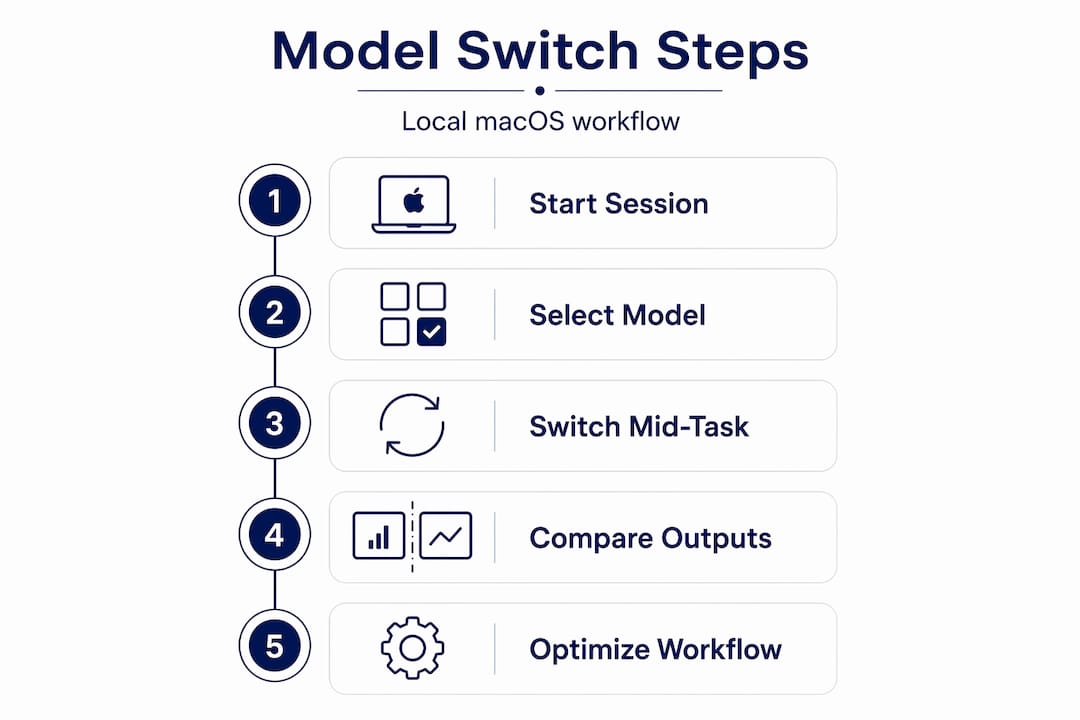
Here is a practical workflow for mid-session switching that works well:
- Start with your strongest local reasoning model for the complex planning or analysis phase. Accept the longer inference time because the quality difference is worth it.
- Switch to a smaller, faster model for execution tasks like drafting, formatting, or simple lookup once the planning is done. Conversation history carries forward automatically, so the smaller model has full context.
- Use reasoning effort controls to tune how many “thinking tokens” each model uses before responding. A lower reasoning effort setting on a capable model can dramatically reduce latency and cost with minimal quality loss for simpler tasks.
- Reserve extended thinking mode for genuinely hard problems, like debugging a complex script or synthesizing contradictory information across sources.
The reasoning effort parameter deserves special attention. On models that support it, you can dial the depth of deliberation up or down per request. This is not just a speed trick. It is a real cost control mechanism when you are running models locally because longer reasoning chains consume more memory bandwidth and thermal budget on Apple Silicon.
Pro Tip: Start each session with a quick mental classification of your task. Ask yourself whether the next step requires judgment or just execution. If it is execution, switch to a lighter model. You will notice the speed difference immediately, and your Mac will thank you.
Some models also support a fast mode that bypasses extended thinking entirely, giving you near-instant responses for tasks where speed matters more than deliberation. Building a habit of matching model capability to task complexity is where AI model optimization actually lives in practice.
Key nuances and challenges in AI model switching on macOS workflows
Model switching is not without its traps. The biggest one involves context window limits, and it is subtle enough to catch experienced users off guard.
Every local model has a maximum context window, measured in tokens. When you switch mid-session to a model with a smaller context window than your current one, the router or inference server may trigger context compaction, which means earlier history may be pruned to fit within the new model’s limits. The conversation continues, but some older context quietly disappears.
Here is a comparison of how common local model tiers typically differ on context window and use case fit:
| Model tier | Typical context window | Best use in mid-session switching |
|---|---|---|
| Large reasoning model | 128k+ tokens | Complex planning, analysis, debugging |
| Mid-size general model | 32k to 128k tokens | Summarization, structured writing, Q&A |
| Small fast model | 4k to 16k tokens | Simple drafting, quick lookups, formatting |
The risk is not just losing old messages. If your automation workflow accumulated a long chain of tool call results from macOS actions, such as files read, URLs fetched, or terminal outputs, and those results sit early in the conversation, a smaller model may never see them after compaction. The downstream behavior of your workflow can shift in ways that are hard to debug.
A second nuance: different models interpret the same context slightly differently even when they receive the same tokens. A task spec written for a highly instruction-tuned model may produce inconsistent behavior when passed to a model trained with a different alignment approach. This is not a dealbreaker, but it is something to test deliberately during your initial model switching setup.
Pro Tip: Before running a long automation session with mid-session switching enabled, test your context compaction threshold by feeding a dummy session with known content and switching models at different points. Confirm that the content you need downstream survives the switch.
Practical AI model switching examples in local macOS setups
Theory is only useful when you can see it working. Here are concrete ways model switching shows up in real macOS workflows.
Local inference server with router mode. If you run a local inference server in router mode, it dynamically loads and unloads model weights per request without restarting the server process. You send a request with model: "llama-3-70b" and the router loads that model, serves the response, and unloads it when another request specifies a different model. One server process manages your entire local model fleet.

GitHub Copilot in VS Code or JetBrains. If you use Copilot for inline suggestions, you can switch the AI model for code completion directly in the IDE, provided you are on the latest VS Code or JetBrains IDE version with an updated Copilot extension. This is machine learning model switching applied directly to your coding environment, letting you trial different models for different codebases or languages.
Privacy-first local automation. The most compelling case for local model switching is the privacy one. Here is a real scenario: you are processing confidential business documents on your Mac. Using a local server with router mode, you run a powerful model for the extraction and reasoning phase, then hand off to a smaller model for formatting the output. Nothing touches the network. No API key is logged. No request leaves the device.
| Workflow stage | Model choice | Reason |
|---|---|---|
| Document analysis | Large local model | Needs deep reasoning |
| Data extraction | Mid-size model | Structured output, fast |
| Report formatting | Small fast model | Speed priority, simple task |
| Final review check | Large local model | Quality gate before output |
The table above captures a real AI model deployment strategy used in privacy-sensitive workflows. It demonstrates how AI model performance evaluation happens not just once at model selection time, but continuously throughout a session.
Why model switching is more than just convenience: An insider’s view
Here is the take most articles skip: the actual value in model switching is not the ability to toggle between models. It is the ability to treat compute as a variable cost you control in real time.
Every request you send to a model is a compute transaction. It has a cost in time, energy, and on Apple Silicon, thermal headroom. When you switch models mid-session without pairing that switch with reasoning effort controls, you are only solving half the problem. You might move from a big model to a small one, but if the small model still runs at maximum thinking depth, you have not saved much.
The highest ROI comes from combining model switching with compute-depth controls like thinking_level or reasoning effort parameters. This is where what is model adaptation becomes a real practice rather than a marketing term. You are not just swapping models. You are shaping the cognitive posture of each request to match exactly what the task demands.
Hybrid reasoning models take this further. Some current models operate in both standard and extended thinking modes using the same underlying weights. You flip a parameter, and the model shifts from fast response mode into deep deliberation mode. No model swap required. This means your switching strategy is sometimes not about the model at all. It is about the mode.
The uncomfortable truth is that most users running local AI on macOS never touch reasoning effort controls. They pick a model, run everything at default settings, and wonder why their Mac runs hot during simple tasks. Treating thinking tokens as a real cost, monitoring how many your workflows consume, and adjusting effort per task type is where serious AI model optimization actually happens. Start there before you add more models to your local fleet.
Start your local AI journey with MingLLM for seamless model switching
If everything above sounds like the kind of local AI workflow you want to build, you need a platform designed around it from the ground up, not bolted on.
MingLLM is built for macOS users who want dynamic model routing, on-device privacy, and full control over their AI workflows without stitching together a dozen separate tools. It supports model switching without context loss, integrates voice, browser, and research surfaces in one local system, and gives you detailed action logs so you can see exactly what each model did and why. If you are serious about personal AI that runs on your hardware and respects your data, this is where to start.
Frequently asked questions
What does AI model switching mean in practice?
It means changing the AI model that processes your requests mid-session without restarting or losing your conversation context, so the system adapts to your task requirements in real time.
How is model switching achieved on local macOS AI setups?
Local setups use router mode to load and unload model weights dynamically per request on the same API endpoint, with no process restarts required.
Can I switch models while coding with GitHub Copilot on macOS?
Yes. With the latest VS Code or JetBrains IDE and an updated Copilot extension, you can switch the AI model used for inline code suggestions directly within your editor.
What should I watch out for when switching models mid-session?
Switching to a model with a smaller context window can trigger earlier context compaction, which silently prunes earlier session history and can affect the consistency of long automation workflows.
How can I optimize performance and cost when using AI model switching?
Combine model choice with reasoning effort controls like thinking_level to adjust compute depth per request, keeping quality high on complex tasks and inference fast on simple ones.